
Windows 11 Finally Lets Users Permanently Reject OneDrive Backup Prompts
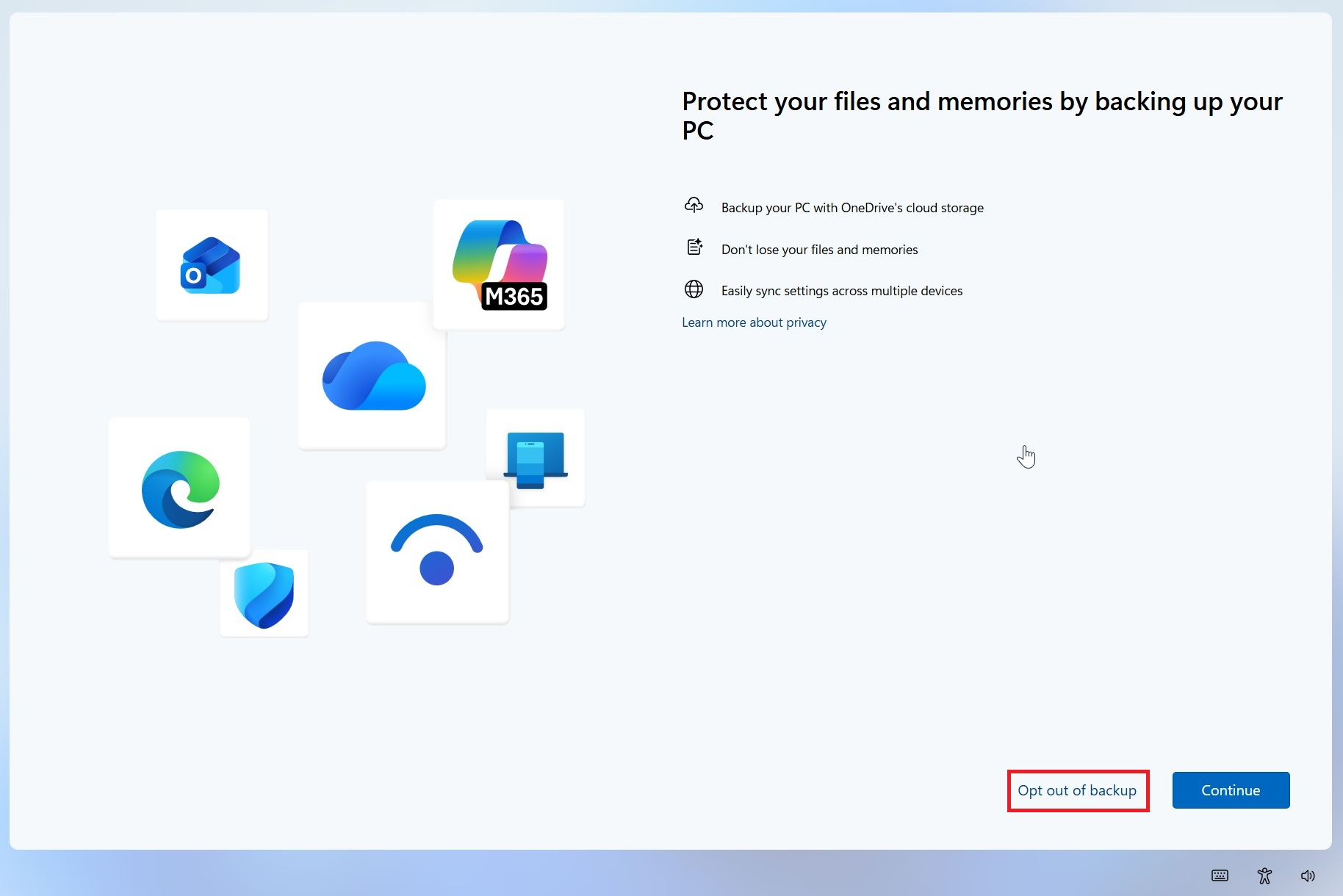
Microsoft appears to be making one of Windows 11's most persistent OneDrive prompts considerably less intrusive by adding a clear Opt out of backup option. The change allows users who do not want Microsoft's cloud backup service to permanently reject the recommendation instead of repeatedly postponing the same full screen notification.
The updated Windows 11 OneDrive backup prompt has been spotted on stable Windows 11 systems, including version 25H2. Previously, users encountering the recommendation were commonly presented with options such as Continue or Remind me in 3 days. Selecting the reminder simply delayed the decision and allowed the same OneDrive promotion to return later.
The new interface instead provides an explicit Opt out of backup option. Selecting it gives users a direct way to reject the OneDrive backup recommendation rather than scheduling another reminder. Microsoft still presents another screen encouraging users to enable backup, but once the process is dismissed, the recurring full screen prompt should no longer continue appearing.
The change should not be confused with completely disabling or uninstalling OneDrive. It primarily affects the Windows backup recommendation and its repeated notifications. Users who already use OneDrive but want to stop Desktop, Documents or Pictures from being uploaded can still open OneDrive Settings, select Sync and backup, then Manage backup and disable individual folders. Microsoft's OneDrive backup controls also allow users to decide whether files remain exclusively in OneDrive or are returned to local PC storage when folder backup is disabled.
Users who want to stop using OneDrive completely still have additional options. Microsoft officially allows a PC to be unlinked from a OneDrive account, while some Windows configurations also permit OneDrive to be hidden or uninstalled. Microsoft's OneDrive disable and uninstall guide continues to document those methods.
Microsoft has already been improving the process for users who decide to disable folder backup. OneDrive version 25.179 introduced an updated opt out experience earlier in 2026 that lets users choose whether files should remain in OneDrive or be moved back to the PC, providing clearer control over where personal files are stored.
The new full screen option represents another improvement in that direction, particularly because OneDrive integration has become increasingly prominent across Windows 11. Microsoft's Windows Backup can synchronize folders, applications, preferences and other settings through a Microsoft account, while OneDrive remains installed by default with Windows 11. Users can still independently control which folders are synchronized through Windows Backup or OneDrive settings.
The adjustment arrives as Microsoft continues making several quality focused changes across Windows 11. The company is also working on reducing Windows 11 memory consumption on PCs with 8 GB of RAM and developing remote PC power controls through Android devices, reflecting a broader effort to improve everyday usability alongside the continued expansion of cloud and AI services.
Microsoft has not published a dedicated announcement confirming the scope or availability of the new OneDrive prompt, so it appears to be rolling out gradually rather than arriving through a specific Windows update. Users may therefore encounter the new option at different times depending on their Windows configuration and Microsoft account.
Giving users a permanent way to reject OneDrive backup should have been part of the Windows 11 experience from the beginning. Cloud backup can be genuinely valuable, particularly when recovering files after a failed drive or moving between computers, but repeatedly presenting the same recommendation after a user has already decided against it does not improve the experience.
The new option does not remove OneDrive from Windows and Microsoft will clearly continue promoting its cloud ecosystem. What changes is user control. A recommendation is far easier to accept when saying no is treated as a legitimate choice rather than simply delaying the same question for another 3 days.
Do you use OneDrive to back up your Windows 11 files, or do you prefer keeping your Desktop, Documents and Pictures stored locally?
