
Open Source NVIDIA NVK Driver Gains DLSS Support for Vulkan Games on Linux
The open source NVIDIA NVK Vulkan driver has reached an important milestone for Linux gaming as initial support for NVIDIA DLSS has been merged into the Mesa 26.2 development branch. The new code allows compatible Vulkan games and Windows titles running through Steam Play to access NVIDIA’s AI powered image reconstruction technology without relying entirely on the company’s proprietary graphics driver. NVK is the community developed Vulkan driver for NVIDIA graphics cards inside the Mesa graphics stack. It was introduced as a modern open source alternative to NVIDIA’s closed driver and has progressed rapidly through work from Valve, Red Hat, Collabora, Mesa contributors, and the wider Linux graphics community.
According to Phoronix, the merged work enables NVK to load the compiled NVIDIA binaries required by DLSS. The implementation builds on Vulkan extensions that allow applications to import and execute NVIDIA CuBIN code, which contains CUDA programs already compiled for compatible GPU architectures.
This is important because DLSS is not implemented entirely inside the open source driver. NVK provides the Vulkan support and integration needed to communicate with the technology, but NVIDIA’s proprietary DLSS libraries and compatible precompiled GPU code are still required. The result is therefore a hybrid approach rather than a completely open implementation of DLSS.
Early work on the feature was completed by Valve Linux graphics developer Autumn Ashton, who demonstrated DLSS running through NVK in 2025. That work focused on the VK_NVX_binary_import and VK_NVX_image_view_handle extensions used by DXVK NVAPI, DXVK, and VKD3D Proton when presenting NVIDIA features to Windows games running through Proton.
The implementation was later updated by developer Thomas Andersen, who resolved merge conflicts, corrected bugs, and adjusted the application programming interfaces before the code was accepted into Mesa 26.2. This moves the project beyond an isolated demonstration and into the main development branch used for future Mesa releases.
DLSS allows supported GeForce RTX graphics cards to render games internally at a lower resolution and reconstruct the image toward a higher output resolution. Tensor cores process motion data, previous frames, depth information, and trained reconstruction models to improve performance while preserving image quality. The exact benefits depend on the game, GPU, output resolution, and selected quality mode.
For Linux users, the new support helps reduce one of the most visible feature differences between NVK and NVIDIA’s proprietary driver. The official NVIDIA stack has supported DLSS in Linux gaming through Proton and related compatibility tools, but players choosing a fully open Mesa based graphics path previously had to give up access to the feature.
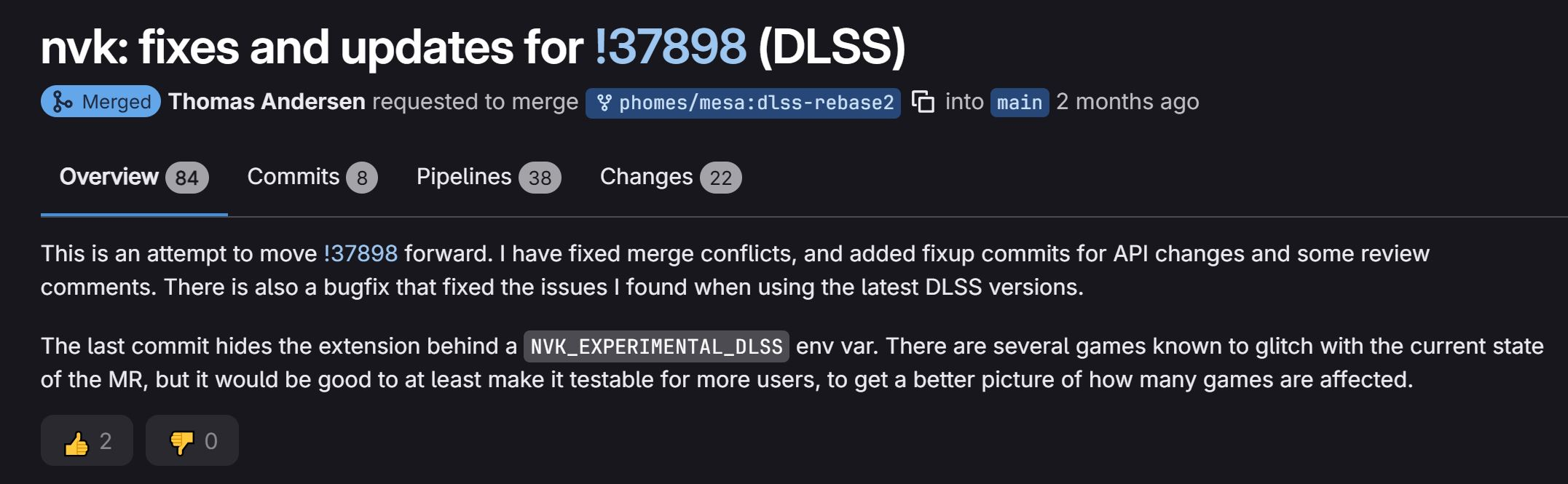
The current implementation is still experimental. The official Mesa NVK documentation says users must enable it through the NVK_EXPERIMENTAL=dlss environment variable. Mesa also provides a dlss_backwards_compat option that can allow compatible code intended for earlier GPU architectures to run on newer hardware.
This restriction exists because the feature still has known bugs and hardware compatibility limitations. NVK can only use DLSS when NVIDIA’s library includes suitable precompiled code for the installed GPU. NVIDIA’s proprietary driver can also process a PTX path for broader compatibility, but NVK does not yet have an equivalent system for translating NVIDIA PTX into Mesa’s NIR representation.
That means support may vary between GeForce generations and DLSS library versions. Mesa currently lists NVK support from Kepler era hardware through Ada and consumer Blackwell GPUs, but the actual DLSS feature requires an RTX graphics card and suitable code inside NVIDIA’s library. Mesa 26.2 is expected to reach stable release in August 2026, although individual Linux distributions may take additional time to package and distribute the update. Early adopters using development repositories will likely test the feature first before it becomes practical for mainstream users.
This development also strengthens Valve’s broader investment in Linux gaming. Proton, DXVK, VKD3D Proton, Gamescope, SteamOS, and Mesa driver development have steadily expanded the number of Windows games that work well outside Microsoft’s operating system. Valve brought NVIDIA DLSS 3 integration and major game fixes to Proton Experimental, showing how NVIDIA features are becoming increasingly accessible across the Linux compatibility stack. The Mesa ecosystem is also becoming more important to Valve’s future hardware plans. Upcoming Steam Machine appeared in the Vulkan 1.4 conformant product database, using an open source Mesa RADV driver and a Valve customized Linux build. Stronger open drivers across NVIDIA, AMD, and Intel could give SteamOS more flexibility across future devices and conventional gaming PCs.
For NVIDIA users, NVK is not yet a complete replacement for the proprietary driver. Performance, power management, advanced display support, CUDA compatibility, and newly released gaming features still vary. However, gaining DLSS support removes one of the largest obstacles for players interested in an open source driver stack.
This is a meaningful step rather than the finish line. NVK still relies on NVIDIA’s closed DLSS binaries, the feature remains experimental, and compatibility is not guaranteed across every RTX GPU. Even so, the fact that modern Vulkan games can now access DLSS through Mesa shows how quickly the open source NVIDIA driver has matured.
The Linux graphics gap is closing through many smaller improvements rather than one single breakthrough. DLSS support, Vulkan conformance, improved Proton compatibility, better shader compilation, and stronger driver performance are gradually making open source NVIDIA gaming more practical. Mesa 26.2 could become one of NVK’s most important releases yet if the new support proves stable across real games and hardware.
Would DLSS support make you consider using NVK instead of NVIDIA’s proprietary Linux driver, or do you still need stronger performance and feature compatibility first?
