
Valve Confirms Steam Machine Red Line Signals Memory Training, Not GPU Failure
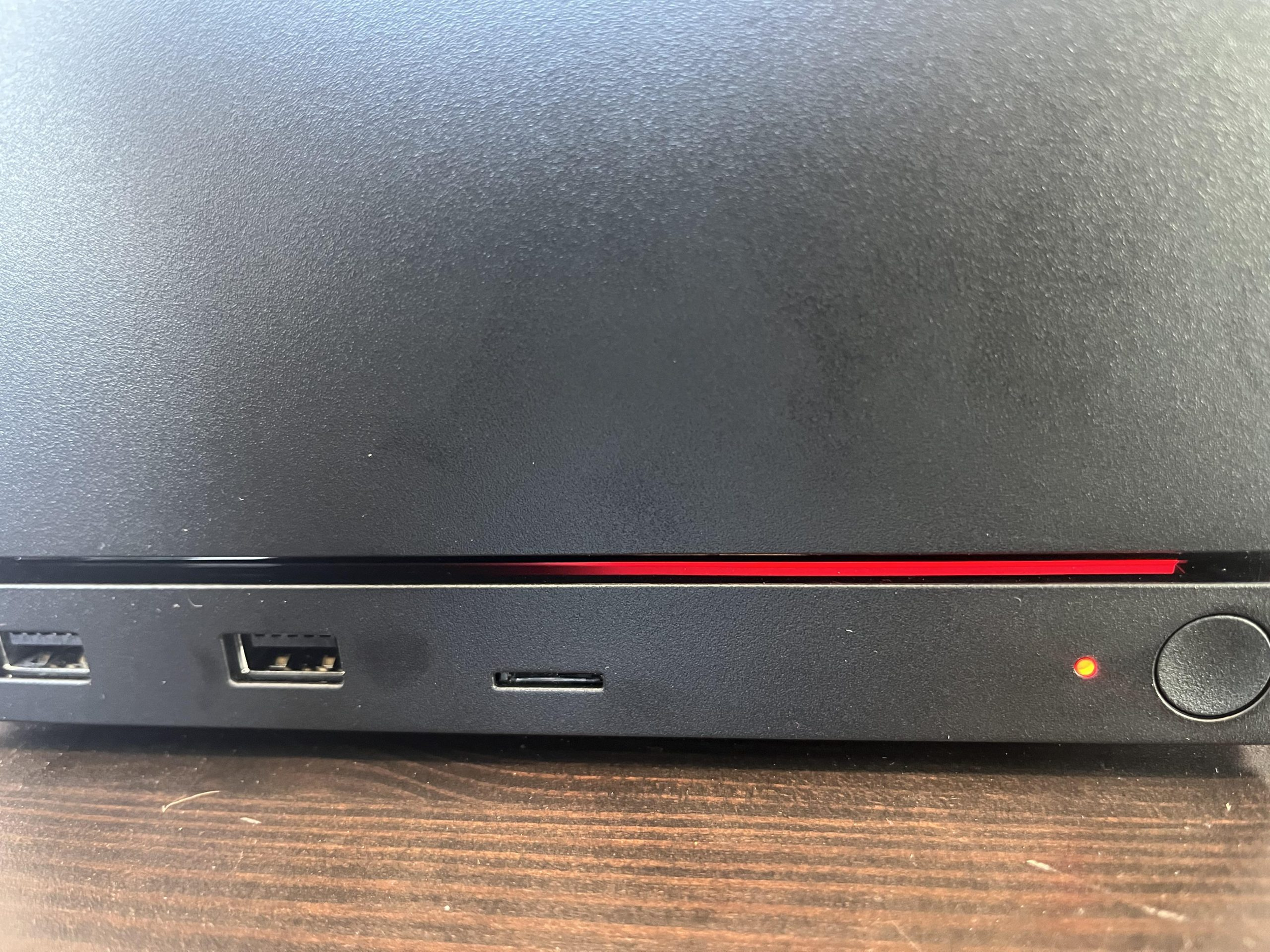
A Steam Machine owner’s apparent hardware failure has turned out to be a far less serious memory training issue after Valve confirmed that the device’s front LED diagnostic codes were horizontally reversed due to an internal miscommunication.
The situation began when Reddit user me_hill reported that their new Steam Machine had stopped booting after approximately 20 minutes of use. The device displayed a red section on its front RGB bar, quickly earning the nickname “Red Line of Death” within the community. Based on Valve’s published diagnostic guidance, the position of the illuminated red indicator appeared to suggest a GPU failure, raising concerns that the newly released system had suffered a major component fault shortly after launch.
The owner attempted several community recommended troubleshooting methods before leaving the Steam Machine disconnected from power overnight. When the system was connected again the following day, it booted normally and returned to working condition. Although this initially appeared to be an unusual recovery from a possible GPU fault, Valve later explained that the diagnostic indicator had been interpreted incorrectly because the front panel code was reversed on shipping units.
According to Valve’s SteamHWFeedback account, the LED layout is flipped horizontally out of the box. Under the intended diagnostic arrangement, a red indicator on one side represents memory training, while the corresponding position on the opposite side may indicate a graphics related failure. Because the physical display was mirrored, the Steam Machine appeared to be reporting a GPU problem when it was actually attempting to retrain its memory after a BIOS update.
Valve stated that the problem likely occurred during or immediately after a BIOS update that did not complete correctly. This left the system unable to finish its memory initialization process until its CMOS configuration was reset.
“Due to a miscommunication, the front panel code is actually flipped horizontally out of the box.”
— Valve SteamHWFeedback
Valve provided an official recovery procedure for Steam Machine owners experiencing the same behavior.
Disconnect the Steam Machine from power and press the power button several times to discharge any remaining energy from the power supply.
Reconnect the power cable and check whether the power indicator begins glowing white with a breathing pattern. Valve advises users who see this pattern to open a Steam Support ticket.
Hold the power button for approximately 6 seconds until the power indicator briefly flashes, then release it.
Wait while the indicator cycles through the available recovery colors. When the light turns green, press the power button once to initiate a complete CMOS reset.
During the next startup, the RGB bar should appear blue. The boot process may take longer because the system must complete a fresh memory training cycle.
Memory training is a normal platform process in which the motherboard establishes stable memory timings, voltages, signal characteristics, and communication parameters before the operating system loads. It can become especially noticeable following BIOS updates, memory configuration changes, or CMOS resets on modern AMD platforms.
Systems based on AMD Zen 4 and Zen 5 processors can require additional startup time while training DDR5 memory. During this process, the machine may restart several times or appear unresponsive while the firmware tests different memory parameters. Interrupting the process or assuming the system has failed can complicate recovery, particularly when the diagnostic indicator itself is displaying mirrored information.
Valve’s clarification indicates that the reported Steam Machine was not affected by a failed GPU or an immediately defective component. Instead, the system was caught in an incomplete firmware and memory initialization state that could be resolved through a full CMOS reset. Current reporting also suggests that only a small number of public cases have surfaced, although the true number of affected systems remains unclear.
The good news is that the Steam Machine’s Red Line of Death appears to be a recoverable firmware issue rather than evidence of widespread GPU failures. However, the incident highlights a significant quality control problem for a product designed to provide a streamlined console style PC gaming experience.
A reversed diagnostic interface can transform a routine memory training delay into what appears to be a catastrophic hardware fault. Enthusiasts familiar with DDR5 platforms may recognize extended training behavior, but mainstream buyers are more likely to interpret an unresponsive system and red warning indicator as a dead device.
Valve should correct the LED orientation through firmware where possible, update its support documentation, and improve BIOS recovery safeguards. Steam Machine owners should not need advanced PC troubleshooting knowledge to determine whether their system is training memory, recovering from a firmware update, or experiencing an actual hardware failure.
The CMOS recovery method provides an effective immediate solution, but the broader priority should be ensuring future BIOS updates can recover automatically without leaving users facing an alarming and incorrectly displayed diagnostic code.
Would a reversed diagnostic indicator affect your confidence in buying a Steam Machine, or does Valve’s straightforward CMOS reset solution adequately address the issue?
