
Ryzen 7 9800X3D Drops From 95°C to 86°C After BIOS Update Fixes Persistent Thermal Throttling

An AMD Ryzen 7 9800X3D owner has reportedly resolved a persistent thermal throttling problem through a motherboard BIOS update, reducing CPU temperatures from 95°C to 86°C under the same 130W workload. The improvement came after more than 1 year of troubleshooting, including multiple cooler installations and a complete cooling system replacement, highlighting how motherboard firmware can influence processor thermal behavior.
The discovery was shared by Reddit user nathandrake84, who explained that their Ryzen 7 9800X3D consistently reached its maximum operating temperature during demanding stress tests. The system used an MSI MAG X870 Tomahawk motherboard, and repeated attempts to resolve the problem through cooling adjustments were unsuccessful. Even replacing an Arctic cooling system with another cooler failed to improve temperatures.
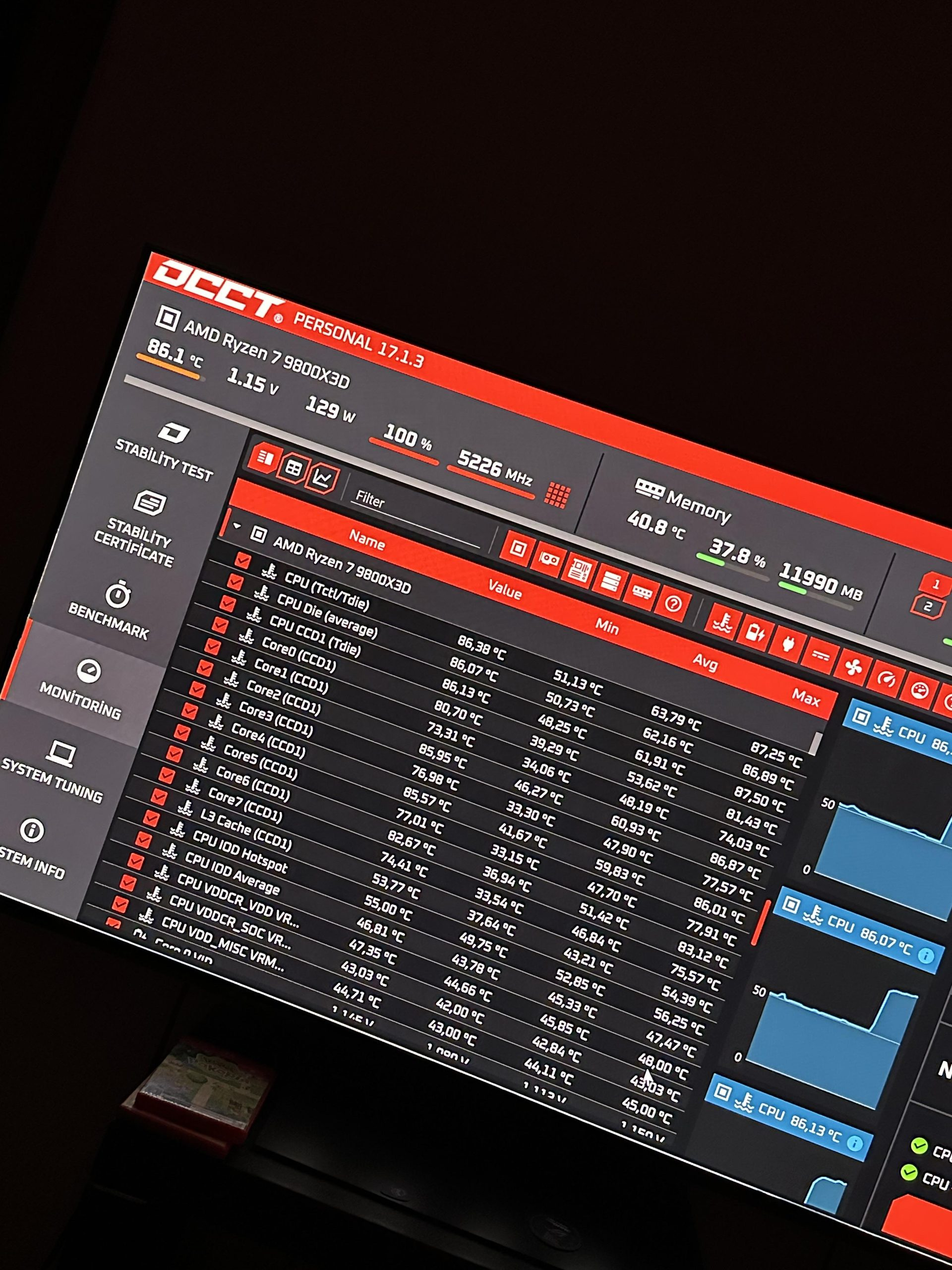
The situation changed after installing the latest available BIOS update. According to the owner, the processor now operates at approximately 86°C under the same reported 130W load, eliminating the performance throttling previously experienced. The specific BIOS version was not disclosed, making it impossible to identify which firmware changes were responsible.
According to AMD's official specifications, the Ryzen 7 9800X3D features 8 Zen 5 cores, 16 threads, 96MB of L3 cache and a maximum operating temperature of 95°C. Reaching this temperature during demanding workloads does not automatically indicate a processor defect, as AMD's Precision Boost algorithms dynamically adjust frequencies and power consumption within thermal and electrical limits.
However, the user maintained that their processor was losing performance at 95°C, rather than simply operating within its normal thermal envelope. The improvement following the BIOS update suggests that firmware configuration, power management or boost behavior may have contributed to the previous results.
One possible explanation is that the new firmware modified voltage management, Precision Boost behavior or other processor operating parameters. BIOS updates can also reset existing settings, meaning the improvement does not conclusively establish a firmware defect. Neither AMD nor MSI has publicly confirmed a specific temperature related BIOS bug responsible for this incident.
The report also reinforces the importance of maintaining updated motherboard firmware, particularly on AM5 systems where BIOS revisions have previously addressed Ryzen 9000 compatibility and stability concerns. Those earlier investigations primarily involved boot failures and should not be considered evidence of the same underlying issue.
For Ryzen owners experiencing unexpected thermal behavior, AMD recommends verifying cooling installation, airflow, background workloads and processor settings while ensuring the system is running current firmware. Updating the BIOS using the motherboard manufacturer's official instructions can be a useful troubleshooting step before investing in additional cooling hardware.
This case demonstrates why high CPU temperatures should not automatically lead to replacing cooling hardware. Modern Ryzen processors rely heavily on motherboard firmware to manage boosting, voltage and power behavior, making BIOS configuration an important part of diagnosing thermal performance.
The reported 9°C improvement at the same 130W power consumption is particularly interesting because it suggests that the original cooling equipment may not have been the primary limitation. However, without detailed voltage, frequency and firmware comparisons, the exact cause remains unknown.
For gamers and PC enthusiasts, the practical lesson is to investigate firmware settings and confirm actual thermal throttling before purchasing a more expensive cooler. A processor reaching its specified temperature limit under heavy stress testing is not necessarily malfunctioning, but consistent performance degradation deserves further investigation.
Have you experienced unusually high Ryzen CPU temperatures that were resolved by a BIOS update, or did you need to improve your cooling system to fix thermal throttling?
