
NVIDIA is expanding its graphics management software with a new GPU App Prioritization feature that allows users to control how their graphics cards prioritize foreground applications and background workloads. Originally introduced for RTX Spark systems, the feature has now appeared on selected GeForce RTX computers through NVIDIA App version 11.0.9.585. However, availability remains inconsistent, and NVIDIA has not officially confirmed which GeForce graphics cards are supported.
The discovery was shared by Reddit user Warkratos, who identified the new controls under System > Advanced in the NVIDIA App. The default configuration reportedly assigns an 80% priority weighting to foreground applications and 20% to background tasks. Selecting Foreground Priority increases the weighting to 90% and 10%, while a custom setting allows users to adjust the distribution as far as 95% and 5%. The interface also offers the option to prioritize background workloads, making it potentially useful for systems running several demanding applications simultaneously.
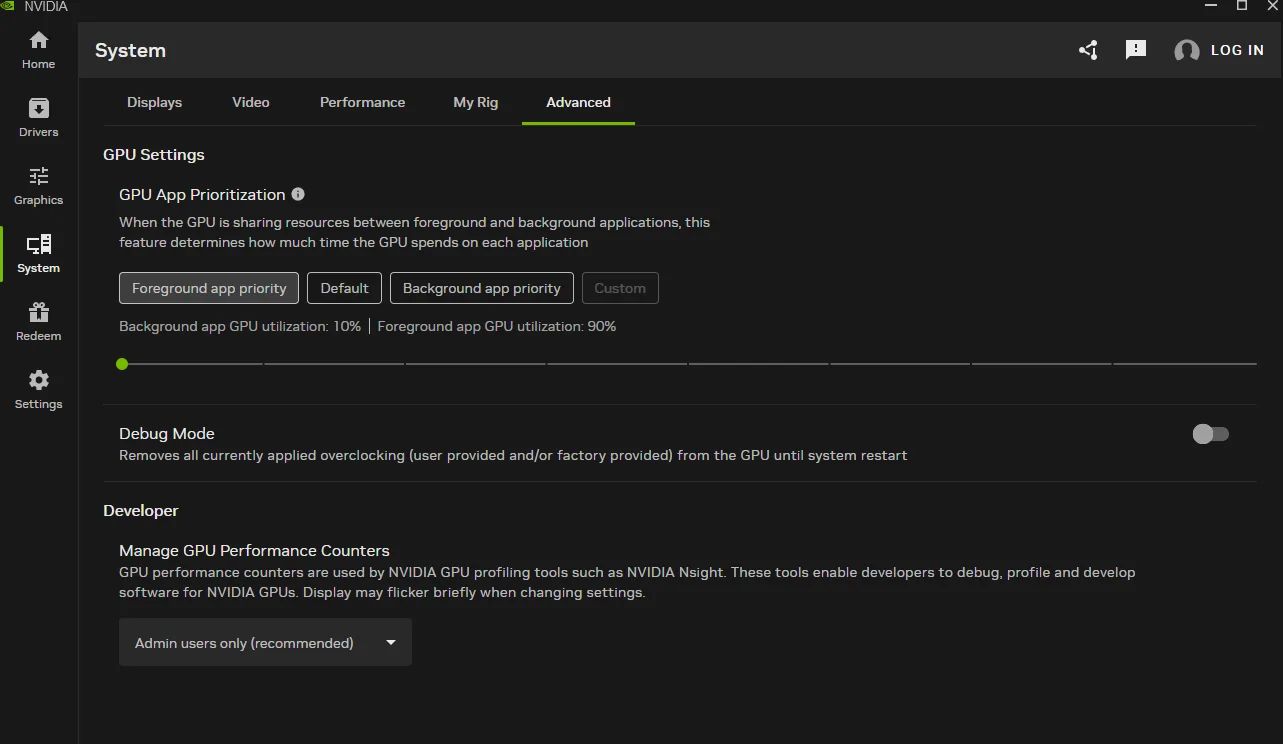
The feature is particularly interesting for gamers who use their graphics cards for more than gaming. A user running a local AI model, GPU accelerated video rendering, or other computational workloads in the background could theoretically prioritize an active game to reduce interference with gameplay. Conversely, developers could allocate greater priority to background AI processing while performing less demanding tasks. However, these percentages represent scheduling priorities rather than guaranteed GPU utilization limits, and NVIDIA has not published detailed information explaining how the allocation works internally.
NVIDIA GPU App Prioritization Settings
| Mode | Foreground Priority | Background Priority |
|---|---|---|
| Default | 80% | 20% |
| Prioritize Foreground | 90% | 10% |
| Custom Example | Up to 95% | As low as 5% |
| Prioritize Background | Adjustable | Adjustable |
The percentages describe reported scheduling priority settings, not reserved GPU processing capacity or guaranteed performance improvements.
Interestingly, the technology itself is not entirely new. NVIDIA officially introduced GPU resource management for RTX Spark on October 28, allowing users to balance resources between active applications and autonomous AI agents running in the background. NVIDIA also confirmed that the feature requires Hardware Accelerated GPU Scheduling to be enabled in Windows, establishing a software dependency for supported RTX Spark systems.
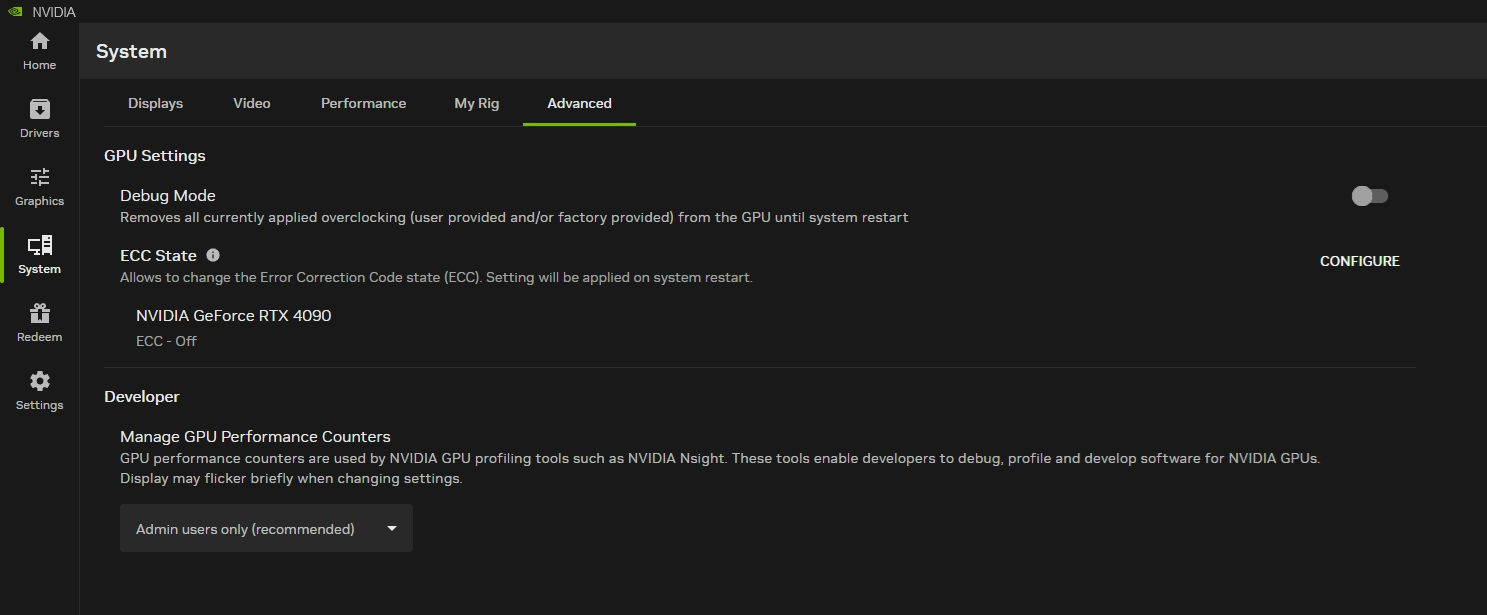
Its appearance on conventional GeForce hardware suggests NVIDIA may be expanding the same functionality to gaming graphics cards, although the exact compatibility requirements remain unclear. Some users report finding the controls on GeForce RTX 5090 systems, while others cannot access them on an RTX 5070 Ti despite running NVIDIA App 11.0.9.585 and driver version 621.12. Separate testing on an RTX 4090 using driver 621.01 also failed to reveal the setting, demonstrating that simply installing the latest software does not guarantee access.
The inconsistent availability could indicate a gradual rollout, additional hardware requirements, or internal testing before a wider release. However, NVIDIA has not explained the situation. Its official NVIDIA App release notes for version 11.0.9.585 mention expanded DLSS overrides, additional game optimization profiles, and stability improvements, but make no reference to GPU App Prioritization for GeForce graphics cards.
The update continues NVIDIA's efforts to consolidate GPU management within a single application. Recent releases have introduced additional driver controls, performance monitoring features, DLSS customization, and improved support for AI workloads. The latest prioritization settings could eventually become useful for enthusiasts operating gaming applications, streaming software, and local AI tools on the same system.
For now, there are no independent benchmarks demonstrating that changing GPU priority improves gaming FPS, frame pacing, or input latency. Its effectiveness will depend on how the driver schedules competing workloads, how applications use the GPU, and whether the system is experiencing resource contention in the first place.
GPU App Prioritization is a practical addition that could become increasingly valuable as graphics cards take on more responsibilities beyond rendering games. Modern RTX GPUs are regularly used for AI inference, video production, 3D rendering, streaming, and traditional gaming, often within the same Windows session. Giving users more control over which workloads receive priority is a sensible improvement.
However, NVIDIA needs to clarify how these settings operate and which graphics cards support them. Priority percentages can easily create unrealistic expectations, especially if users interpret a 90% foreground weighting as a guarantee that their game will receive 90% of the GPU's available processing power.
The potential benefits are also workload dependent. A gaming PC running only lightweight background applications may see little improvement, while a system simultaneously processing local AI models and graphics intensive games could benefit from better resource scheduling.
We support technologies that give users greater control over hardware they already own. As local AI becomes more accessible, efficient resource management could help gamers and developers share GPU capabilities without requiring separate systems or additional hardware investments.
NVIDIA's next step should be providing clear compatibility information, measurable performance data, and consistent access across supported RTX generations.
More GPU control is welcome, but the feature will only become truly useful when consumers understand exactly what it changes and how it benefits their workloads.
Would you use NVIDIA's GPU priority controls to give games more resources while running local AI or rendering tasks in the background, or do you prefer letting Windows and the graphics driver manage everything automatically?
