
48 Hz Tweak Cuts 2019 MacBook Pro GPU Idle Power From 14 W to 3 W in Boot Camp
A 2019 Intel MacBook Pro owner has developed an open source utility that dramatically reduces GPU power consumption while running Windows through Boot Camp. On a 16 inch MacBook Pro equipped with an AMD Radeon Pro 5300M, switching the internal display from 60 Hz to 48 Hz reportedly reduced idle GPU power from 14 W to 3 W, while GPU temperature dropped from 66°C to around 51°C under the same brightness and idle conditions. The result represents a reduction of approximately 79% in reported idle GPU power consumption.
The issue appears to involve the Radeon Pro 5300M memory clock remaining elevated while the internal display operates at 60 Hz under Boot Camp. According to the owner, attempts to reduce CPU power, disable Turbo Boost, and modify Windows power settings provided only limited improvements. Switching to 48 Hz allowed the GPU memory to clock down properly, reducing heat, fan activity, and battery consumption.
Interestingly, 48 Hz is already an officially supported refresh rate for the 2019 16 inch MacBook Pro display under macOS. Apple lists 47.95 Hz, 48 Hz, 50 Hz, 59.94 Hz, and 60 Hz among the supported refresh rates for the model. The problem is that Boot Camp does not normally expose the 48 Hz option inside Windows.
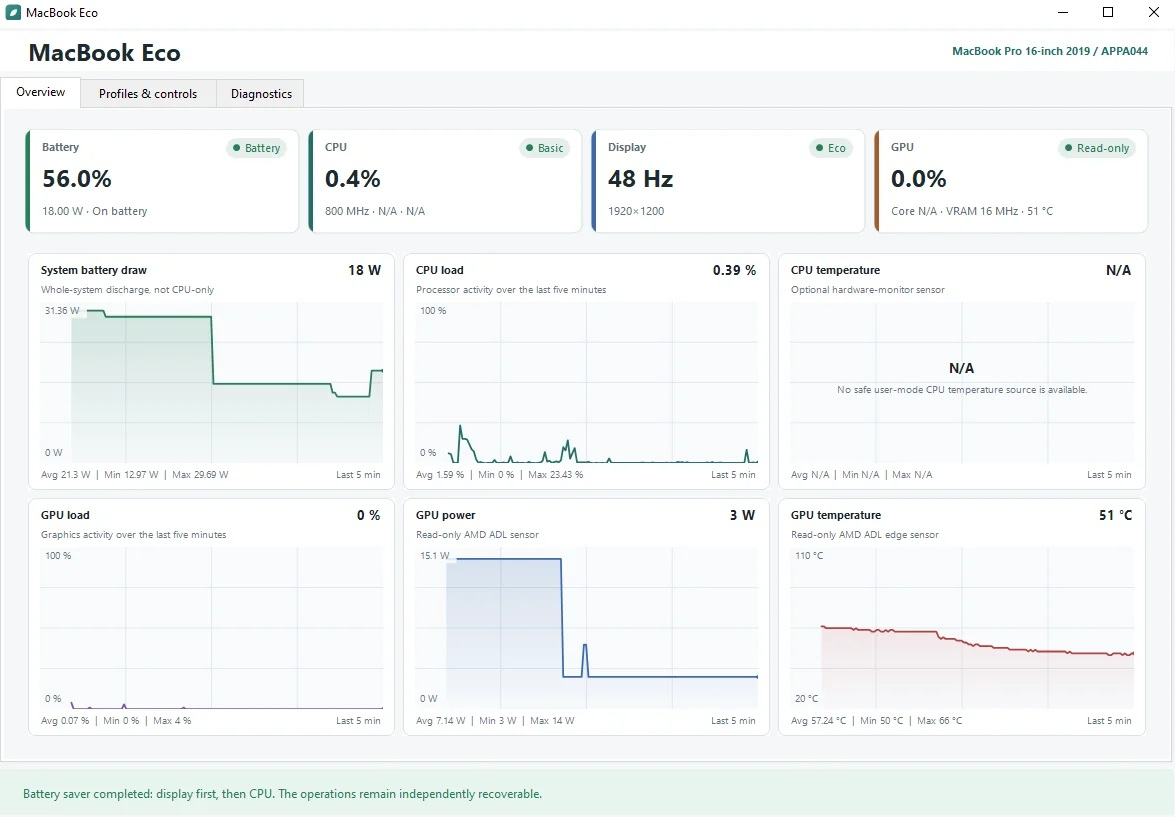
To automate the workaround, the owner created MacBook Eco, a free open source Windows utility capable of installing the reviewed 48 Hz display profile and switching between 48 Hz and 60 Hz with automatic rollback if the new display mode fails. The application also provides optional CPU power presets and basic system telemetry.
There is an important limitation. The current 0.1.3 alpha release only enables display changes on the exact configuration tested by its developer: a 2019 MacBookPro16,1, APPA044 internal display panel, and Radeon Pro 5300M. Other systems remain limited to diagnostic functionality, and the developer has only confirmed testing under Windows 10. The current release is also unsigned, so users should carefully review the supported hardware and recovery documentation before applying display modifications.
This is a surprisingly effective workaround for a machine that is now almost 7 years old. Dropping from 60 Hz to 48 Hz is a relatively small compromise for normal desktop workloads, yet the reported reduction from 14 W to 3 W demonstrates how an incorrectly sustained GPU memory state can significantly affect thermals and battery life. The bigger takeaway is that the problem appears to be related to Boot Camp behavior rather than a fundamental limitation of the display, since Apple itself officially supports 48 Hz on this MacBook Pro.
Would you sacrifice 60 Hz for 48 Hz if it reduced your laptop GPU idle power consumption by nearly 80% and significantly lowered temperatures?
